QuickTalker FeatherTouch 23
Last updated Nov 1, 2026 · 4 entries in Page history
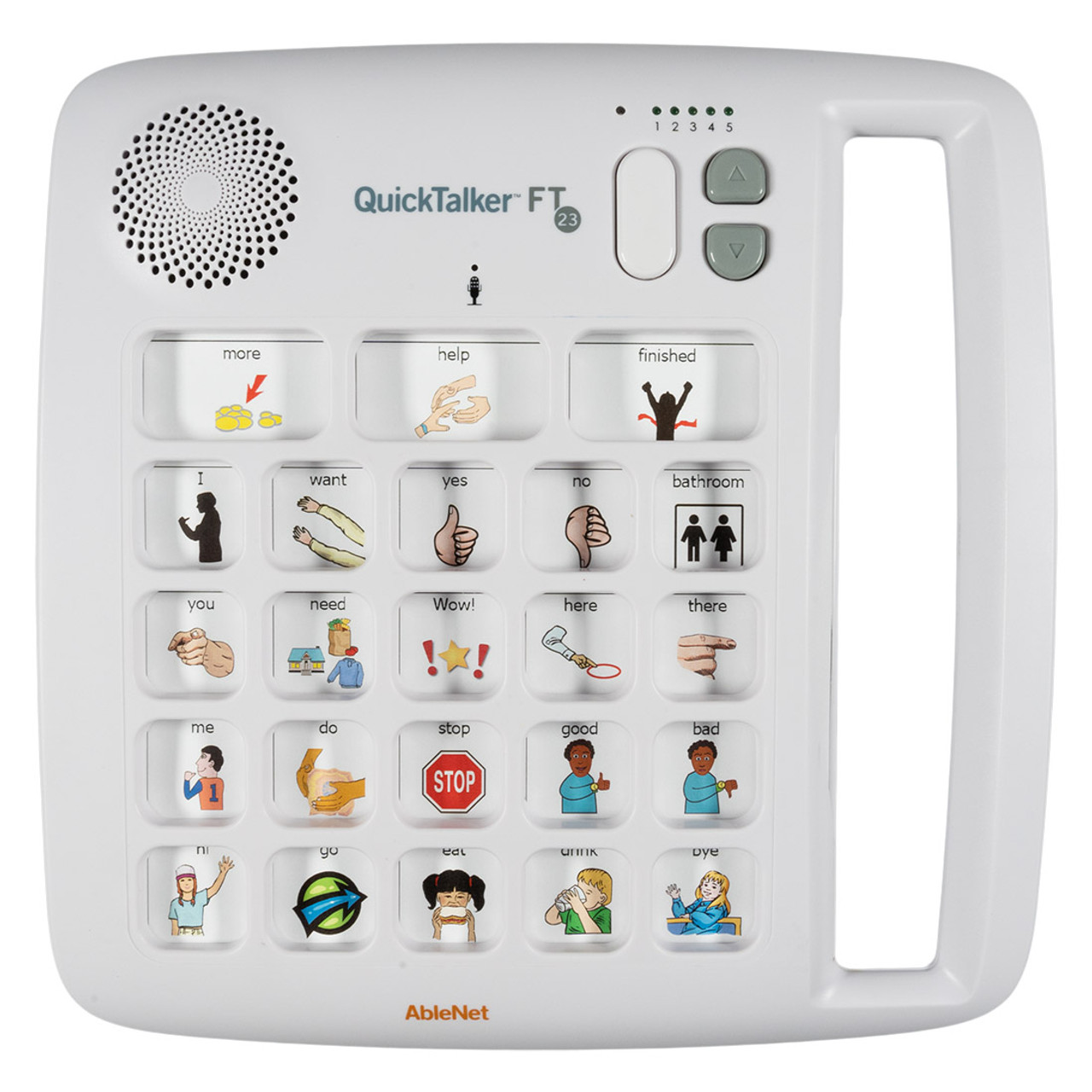
The QuickTalker FeatherTouch 23 is a portable speech device with three core messages and 20 messages on each of five recording levels, 103 unique messages in all. It runs on 4 AA batteries and has a carrying handle.
- Part number or model
- 10000038
- UDID
- 00186648000814
- Catalog number
- Not assigned yet
- Searched on PriceQ as
- “Ablenet QuickTalker 23”
Specifications
32 fields, as the sources state them
Product
- Product Number
- 100000381
Overview
- Overview
- The QuickTalker FeatherTouch 23 speech device provides multi-message communication that is highly portable, durable, and easy to use. The FeatherTouch membrane responds to the lightest touches and smallest fingers, and makes it easy for almost anyone to communicate. QuickTalker FeatherTouch 23 includes 103 unique messages available across five recording levels and provides an individual with robust communication options throughout the day. Batteries included Includes ableCARE on-demand support Built ableSTRONG to endure drops and other environmental conditions Made from ableSAFE materials and tested by third-party safety labs1
- Common Uses
- For the three core messages that are the same on every recording level, record common requests like "I need help", "I need to use the bathroom", and "I'm thirsty" Record messages like "turn the page", "look", "I like this", and "I want to stop" for use when reading a book Use each recording level to record messages based on the environment like the classroom, lunchroom, playground, bus, and at home1
- Features
- Better than ever digital sound output suitable for almost any environment Includes three core messages that are the same on every recording level Includes 20 messages that are different on each recording level1
- Symbol Overlays
- Symbol overlays are not included with the QuickTalker FeatherTouch 23. Download the free AbleNet Symbol Overlay app for iPad to create symbol overlays for your AbleNet speech device.1
Technical Specifications
- Messages / Recording Levels
- 20 + 3 core / 52
- Recording Time
- 18-min2
- Switch Input
- No2
- Toy/Appliance/ECU Output
- No2
- Activation Surface
- 3 core messages - 2.2 x 1.2-in (8.6 x 6.7-cm); 20 unique messages 1.2 x 1.2-in (3 x 3-cm)2
- Weight with Battery
- 26.4-oz / 748-g2
- Battery Type
- 4 AA (included)2
- Accessories Available
- No2
- Mounting Connection
- No, includes carrying handle2
- HCPC Code
- E25022
ableCARE, ableSAFE, and ableSTRONG
- ableCARE
- Our ableCARE program removes stress and barriers in implementing AbleNet solutions. The ableCARE Product Success team is an extension of your school or clinic team and is standing by ready to provide guidance and knowledge so you and your team build confidence in implementing the AbleNet solutions you've invested in.3
- ableSAFE
- Certified third-party laboratories test ableSAFE products to ensure they meet or exceed current global safety standards. When you see the ableSAFE badge, you know you are using a device engineered with safety in mind, made from high-quality materials, and safe for all users.3
- ableSTRONG
- ableSTRONG products are designed to be dropped, encounter moisture and dirt, and keep performing so users can achieve best outcomes. Before being approved as ableSTRONG, AbleNet products go through a series of durability tests to ensure they can stand up to a variety of environmental factors.3
Regulatory
- Regulatory
- This product is compliant with Medical Device Regulation 2017/45.4
INTENDED PURPOSE
- INTENDED PURPOSE
- QuickTalker FT 23 is an easy-to-use communication aid with voice output and intended for people who cannot or cannot yet use more complex static or dynamic systems.5
CLINICAL BENEFITS OF THE DEVICE
- CLINICAL BENEFITS OF THE DEVICE
- Beginning device to assist a patient with verbal communication. The benefit is to maximize the efficiency and effectiveness of communication for individuals who are unable to communicate via verbal speech.5
PERFORMANCE CHARACTERISTICS AND INFORMATION FOR HEALTH CARE PROFESSIONAL
- Material
- Housing – ABS Plastic5
- Suggested Operating Environment: Ambient Temperature Range
- 32°F – 95°F (0°C – 35°C)5
- Suggested Operating Environment: Humidity
- 10% - 95% (no condensation on device)5
- Suggested Transportation and Storage: Ambient Temperature Range
- -25°F - 158°F (-31°C – 70°C)5
- Suggested Transportation and Storage: Humidity
- 10% - 95% (no condensation on the device)5
RISKS, WARNINGS, AND CONTRA-INDICATIONS
- RISKS, WARNINGS, AND CONTRA-INDICATIONS
- QuickTalker FT 23 is neither waterproof nor completely water resistant. Do not immerse QuickTalker FT 23 in water or any other liquid. Make sure that no liquids are spilled on QuickTalker FT 23. QuickTalker FT 23 is not recommended to be used as access to a call system.5
DEVICE OVERVIEW
- DEVICE OVERVIEW
- Speaker Recording Indicator Light Level Selection Level Indicators Volume Adjust Buttons Symbols Overlay + Storage Full Length Handle Individual Message Locations Core Message Locations Microphone Record Button Power On/Off Battery Compartment5
DEVICES USED TOGETHER WITH
- DEVICES USED TOGETHER WITH
- QuickTalker FT 23 is a self-contained speech communication device. No other devices connect to the QuickTalker FT 23.5
WARRANTY
- WARRANTY
- AbleNet manufactured products include a 2-year limited warranty. This warranty is against defects in materials and manufacturing for 2-years from the date of purchase. Full warranty details available at www.ablenetinc.com.6
Getting Started
- To get started
- 1. Add four alkaline AA batteries to device (batteries not included). 2. Add a printed picture symbol overlay to device (not included). 3. Turn device on. 4. Select recording level. 5. Press and hold the record button until the recording indicator light turns on, then release the record button. 6. Press and release the desired message location. Begin speaking into microphone to record message. Press and release the desired message location a second time to stop recording. 7. Repeat step 6 for other message locations. 8. Press record button to turn the recording indicator light off and exit record mode. 9. Your device is now ready to use.6
How long is the total recording time on the QuickTalker FT?
- The total recording time across all levels combined is
- QuickTalker FT 23 – 20 minutes of total recording time7
Sources: ablenetinc.com, Product title, Product Number and Overview tab, read Nov 1, 2026 UTC; ablenetinc.com, Technical Specifications tab of the product page, the text file the tab loads, read Nov 1, 2026 UTC; ablenetinc.com, ableCARE, ableSAFE, and ableSTRONG tab of the product page, read Nov 1, 2026 UTC; ablenetinc.com, Regulatory tab of the product page, the text file the tab loads, read Nov 1, 2026 UTC; files.ablenetinc.com, Instructions For Use, QuickTalker FT 23, English section, pages 1 to 3 and 6, read Nov 1, 2026 UTC; files.ablenetinc.com, Quick Start Guide, QuickTalker FT 7/12/23, English panel, read Nov 1, 2026 UTC; support.ablenetinc.com, How long is the total recording time on the QuickTalker FT?, Answer, read Nov 1, 2026 UTC.
Size and weight
Inches and pounds, millimetres and kilograms
The product
| What | Inches and pounds | Millimetres and kilograms |
|---|---|---|
| WeightWith battery | 26.4 oz1.65 lbconverted | 748 g0.748 kgconverted |
Figures in black are the maker’s. Figures in grey are converted by the wiki (1 in = 25.4 mm, 1 lb = 0.45359237 kg).
Compare with
2 of the same family on the wiki

More from AbleNet
7 pages on the wiki
Documents
2 linked, none copied here
References
8 sources, each with the day it was read
- ablenetinc.com, Product title, Product Number and Overview tab, read Nov 1, 2026 UTC. Supports 5 specifications
- ablenetinc.com, Technical Specifications tab of the product page, the text file the tab loads, read Nov 1, 2026 UTC. Supports 10 specifications
- ablenetinc.com, ableCARE, ableSAFE, and ableSTRONG tab of the product page, read Nov 1, 2026 UTC. Supports 3 specifications
- ablenetinc.com, Regulatory tab of the product page, the text file the tab loads, read Nov 1, 2026 UTC. Supports 1 specification
- files.ablenetinc.com, Instructions For Use, QuickTalker FT 23, English section, pages 1 to 3 and 6, read Nov 1, 2026 UTC. Supports 10 specifications, the UDID, the documents
- files.ablenetinc.com, Quick Start Guide, QuickTalker FT 7/12/23, English panel, read Nov 1, 2026 UTC. Supports 2 specifications, the documents
- support.ablenetinc.com, How long is the total recording time on the QuickTalker FT?, Answer, read Nov 1, 2026 UTC. Supports 1 specification
- support.ablenetinc.com, Getting Started With QuickTalker FT 7, 12, and 23 Speech Devices, read Nov 1, 2026 UTC. Supports the related products
Page history
Every read and every change to this page, newest first
- Page created from the maker’s page, among the products buyers searched on PriceQ. Product type proposed. Descriptions written at three lengths from the specifications.Claude Opus (AI agent) · Not reviewed yet
- Read on ablenetinc.com: Product title, Product Number and Overview tab; Technical Specifications tab of the product page, the text file the tab loads; ableCARE, ableSAFE, and ableSTRONG tab of the product page; Regulatory tab of the product page, the text file the tab loads.Claude Opus (AI agent) · Not reviewed yet
- Read on files.ablenetinc.com: Instructions For Use, QuickTalker FT 23, English section, pages 1 to 3 and 6; Quick Start Guide, QuickTalker FT 7/12/23, English panel.Claude Opus (AI agent) · Not reviewed yet
- Read on support.ablenetinc.com: How long is the total recording time on the QuickTalker FT?, Answer; Getting Started With QuickTalker FT 7, 12, and 23 Speech Devices.Claude Opus (AI agent) · Not reviewed yet
The descriptions are written by the wiki from the specifications above, never copied from the maker.
Live prices · PriceQ
What sellers ask for the AbleNet 10000038 today.
The wiki holds what the maker publishes. PriceQ looks up the sellers. The button opens it with this product already filled in.